How AP automation works for a 40-vendor finance team
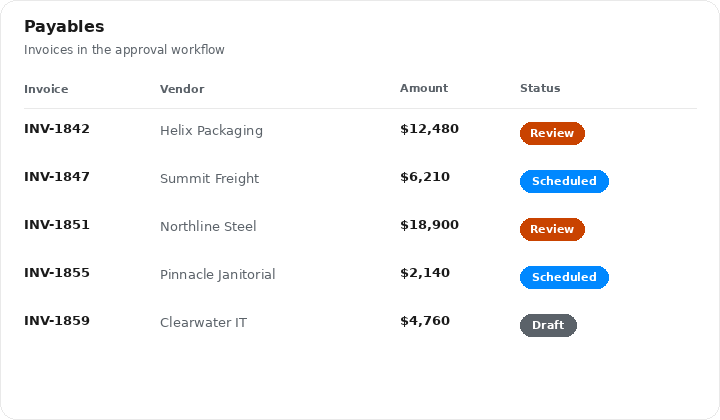
A 40-vendor books file is still small enough that people try to run it in a spreadsheet. That is where the trouble starts. Duplicate invoices, missed due dates, and one-off payment exceptions all hide in the same grid.
AP automation is not a black box. It is a repeatable path from invoice intake to approved payment, with a record you can audit. Controllers need that path more than they need another dashboard.
This note walks through how that path works when vendor count is still human-scale. The same steps apply later. They just get louder.
Intake before anyone touches a payment
Every invoice should land in one queue. Email, portal, and PDF attachments all count. If intake is split, automation has nothing clean to work on.
Match the invoice to a vendor record and a purchase or accrual. Flag mismatches instead of guessing. A 40-vendor file still produces enough exceptions that guessing becomes policy.
What the queue should show
Status, due date, amount, and who owns the next action. If those four fields are missing, people will keep a side list. The side list is where payments go missing.
Approvals should follow the vendor and the amount, not whoever happens to be online. Route, remind, and record. Then pay.
- Capture every invoice in one intake queue, including PDFs from email.
- Match vendor, amount, and due date before anyone can mark it ready to pay.
- Keep exceptions in the same queue. Do not move them to a private sheet.
Approvals that still move invoices
A 40-vendor team often has two approvers and a controller who steps in when either is out. Encode that. Do not rely on a Slack ping that disappears.
Thresholds should be visible on the invoice. If the amount crosses a line, the next person is named in the record, not implied.
Payment timing
Pay on the schedule you set with the vendor, not the day someone remembers. Early payment is a choice. Late payment is a control failure.
Batch payments so cash outflows are planned. The schedule belongs next to the invoice, not in a calendar reminder.
- Name the approver on the invoice, including the backup when that person is out.
- Show the amount threshold that changes who must sign.
- Keep the approval history with the invoice so month-end does not become a hunt.
What 40 vendors still break
Duplicate vendors. Split invoices. Credits that never hit the next payment. These are not ERP problems. They are queue problems.
Automation helps when the vendor record is the source of truth. If two records exist for the same payee, the queue will keep paying the wrong one.
- Merge duplicate vendor records before you automate payments.
- Apply credits on the next scheduled payment, not as a separate memory.
- Close the invoice only after the bank line matches the scheduled amount.
Where Control fits
Control is the operations layer for that queue. It is not a bank and it does not lend. It keeps intake, approval, and payment timing in one place so the spreadsheet is no longer the system of record.
Start with vendors you already pay on a schedule. Automate that path first. Add exceptions after the routine payments are boring.
- Put intake, approval, and payment status on the same record.
- Pay on the vendor schedule you already agreed to, then expand.
- Leave cash movement to the bank. Keep the record of why you paid in Control.
Get payment alerts by text.
Account notifications for payments, invoices, and cash flow warnings. No promotional messages.